Teamspeak 6 Updates

Drop in, start a thread, argue about loadouts. All the usual.

Home › Forums › Gaming News › Teamspeak 6 Updates

OP bumfluff -U4EA- Admin

TeamSpeak 6.0.0-beta5 – Foundation III Update
It’s time… to call your friends!

Foundation III is a very special milestone for TeamSpeak.

For the first time ever, TeamSpeak now supports 1-1 Direct Calls. That means, you can now call another user directly, with voice, video and screensharing, without having to join the same server or channel first.

It’s a new way to use TeamSpeak, and we’re really looking forward to seeing what you all think.
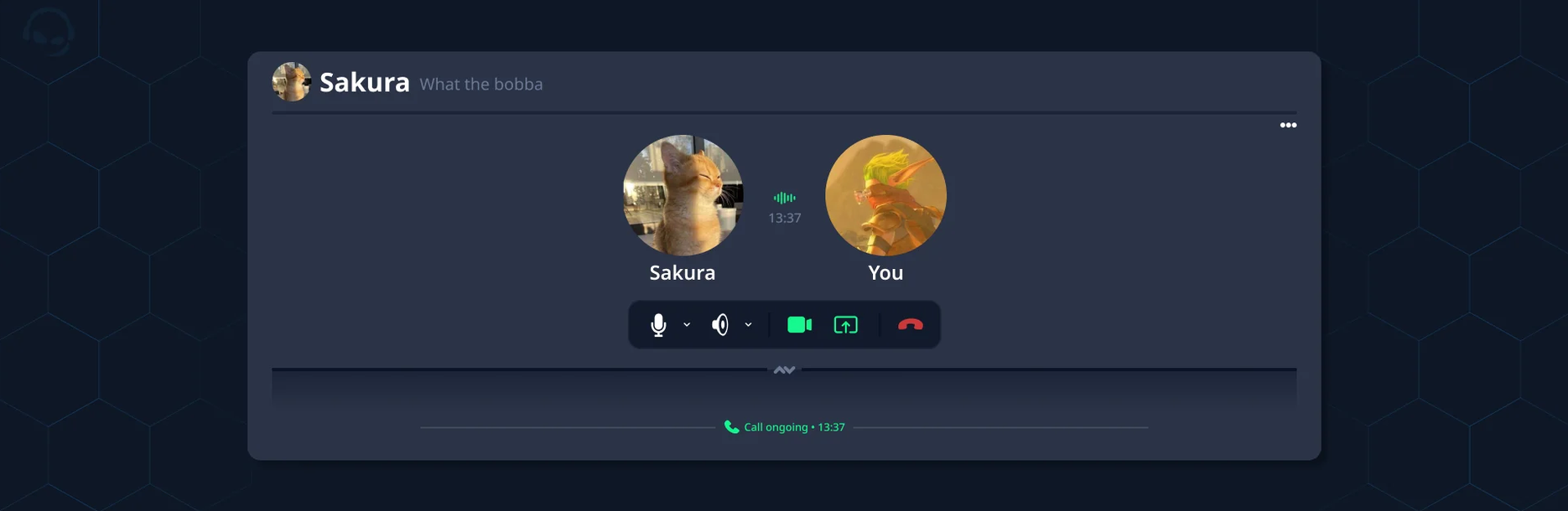
uploaded image

r/teamspeak – TeamSpeak 6.0.0-beta5 – Foundation III Update

Foundation III brings direct calls and video together. It introduces 1:1 direct calls with a new call action bar, chat events and the usual sound processing from servers. A completely reworked call and screen-share layouting engine with Picture-in-Picture support and improved fullscreen behavior that allows settings or context menus.

Screen-sharing also gains multi-application audio capture on Windows, Linux and macOS, single-stream popouts, better A / V sync and more robust P2P connection handling. On Linux, global hotkeys now work on Wayland on all major Portal-Backends.

Finally, we also introduce multitrack local recording with a dedicated recording view. We also introduce smaller new features, like channel file transfers supporting drag-and-drop of large files, 2FA recovery codes, reworked virtual list for severely increased performance and new streaming defaults for nearly all encoders for better quality and performance.

The whole client also received a broad round of audio, stability and performance fixes.
✨ What’s New

Added 1:1 direct calls: incoming-call dialogs, call action bar, live talk indicators, mute controls, quick start buttons to start streaming, notification settings and popout support

Added multitrack local recording with per-speaker tracks, a master mix, a timeline view with waveforms and mixer, configurable output folder and mode, and pause/resume

Added multi-application audio capture on Windows (Windows 10 22H2 or later), Linux and macOS: pick the applications to capture audio from, with per-application volume

Added Picture in Picture: focus one stream while keeping the others as draggable corner tiles (hold Shift for a placement preview)

Added global hotkey support on Linux Wayland (GlobalShortcuts portal for KDE/GNOME, Hyprland .conf/Lua binds, Vicinae and the xx-hotkey-v1 protocol)

Added hotkeys and configurable sound notifications for starting, stopping, pausing and resuming local recordings

Added a recording indicator in the server tree, connection activity and server context menu

Added support for dragging & dropping files larger than 5MB into channel file transfer

Added 2FA recovery codes and redesigned the 2FA flows

Added a “missing permission” hint where the channel description would appear if viewing it is not allowed

Added configurable ICE UDP port range in the Developer Tools

Added macOS popout support

Added single-stream popouts support

Added reworked fullscreen mode with context-menu support and call action bar support

Added a reworked call and screen-share grid with a new row/block solver, pagination and a focus view, synced across popouts

⚙️ Improvements

Improved A / V sync between streams (requires beta5+ clients on both ends)

Improved encoder tuning for low latency, a safer and quicker keyframe requests, live bitrate updates on macOS VideoToolbox, more robust QSV encoding

Improved speed of the source and application catalogues and their thumbnails

Improved virtual-list performance and improved scroll anchoring behavior

Improved chat code-block highlighting and embed rendering performance

Improved Opus FEC by driving redundancy from measured talker packet loss

Improved shutdown speed and reliability

Improved the updater and added atomic-update support for updating on macOS

Reduced memory usage of the embedded browser

🛠️ Bug Fixes

Fixed screen-share audio distorting and crackling over time

Fixed fast, smeared microphone audio on capture interfaces reporting more than two channels (Windows)

Fixed capture and playback failing to start on single-clock USB interfaces (e.g. Focusrite Scarlett) when default sample rates differ (Windows)

Fixed memory corruption and crash when a device changes audio format to or from WAVE_FORMAT_EXTENSIBLE (Windows)

Fixed crashes when switching playback devices and during audio teardown

Fixed Windows audio device enumeration issues

Fixed push-to-talk not working while an elevated Windows game has focus for per-machine installs

Fixed a startup deadlock caused by notification sounds

Fixed BT.709 color transform not being used when converting BGRA/NV12/YUV420 frames

Fixed not being able to reconnect to a stream in some cases

Fixed stream not stopping correctly when closing the capture via the system indicator (Linux)

Fixed potential crash when stopping a stream in a popout

Fixed P2P screen-shares hanging in Connecting or kicking users after a connection loss

Fixed large P2P offers being silently dropped after ICE restarts or codec changes

Fixed one stalled viewer freezing a shared-encoder screen-share for every viewer

Fixed stream timeouts being too strict

Fixed queued downloads hanging forever, concurrent downloads of the same file dropping each other, deadlocks when uploading multiple files and umlauts in file transfers

Fixed silent failure when a server’s well-known lookup returns no endpoint

Fixed editing messages in encrypted chats not being applied correctly when clearing the tschat cache (or using a fresh profile)

Fixed chat messages not being saved in some cases

Fixed CTRL+B (and other stylings) not working correctly in the editor in some cases

Fixed hotkey recording issues and styling

Fixed launching external applications on Linux blocking the main process in some cases (e.g. opening files from chat)

Fixed shadowed .desktop entries being revived on Linux after the rename

Fixed resize-observer loop in the chat input causing unnecessary CPU load

Fixed the recording icon animation causing permanent CPU load

Fixed appearance settings server tree not rendering and server icon overflow in snapshot previews

Fixed stale content views when switching between multiple servers

Fixed archived contacts presence and duplicates in contact list categories

Fixed number inputs ignoring default values and clamping or applying clamping live

Fixed not showing the message context menu when clicking beside a message

Fixed the device picker not showing the correct device in some cases

Fixed the audio stream setting showing a wrong value or not being reactive across windows

Fixed crashes on shutdown, including when closing the client while streaming

Fixed crash when the server sends hints in the wrong order

Fixed noisy sounds and toasts for benign permission errors

Fixed several minor design and layout issues throughout the client

U4EA Server
  • Creator
    Topic
  • #4218
    bumfluff
    -U4EA- Admin

    TeamSpeak 6.0.0-beta5 – Foundation III Update
    It’s time… to call your friends!

    Foundation III is a very special milestone for TeamSpeak.

    For the first time ever, TeamSpeak now supports 1-1 Direct Calls. That means, you can now call another user directly, with voice, video and screensharing, without having to join the same server or channel first.

    It’s a new way to use TeamSpeak, and we’re really looking forward to seeing what you all think.

    uploaded image

    r/teamspeak – TeamSpeak 6.0.0-beta5 – Foundation III Update

    Foundation III brings direct calls and video together. It introduces 1:1 direct calls with a new call action bar, chat events and the usual sound processing from servers. A completely reworked call and screen-share layouting engine with Picture-in-Picture support and improved fullscreen behavior that allows settings or context menus.

    Screen-sharing also gains multi-application audio capture on Windows, Linux and macOS, single-stream popouts, better A / V sync and more robust P2P connection handling. On Linux, global hotkeys now work on Wayland on all major Portal-Backends.

    Finally, we also introduce multitrack local recording with a dedicated recording view. We also introduce smaller new features, like channel file transfers supporting drag-and-drop of large files, 2FA recovery codes, reworked virtual list for severely increased performance and new streaming defaults for nearly all encoders for better quality and performance.

    The whole client also received a broad round of audio, stability and performance fixes.
    ✨ What’s New

    Added 1:1 direct calls: incoming-call dialogs, call action bar, live talk indicators, mute controls, quick start buttons to start streaming, notification settings and popout support

    Added multitrack local recording with per-speaker tracks, a master mix, a timeline view with waveforms and mixer, configurable output folder and mode, and pause/resume

    Added multi-application audio capture on Windows (Windows 10 22H2 or later), Linux and macOS: pick the applications to capture audio from, with per-application volume

    Added Picture in Picture: focus one stream while keeping the others as draggable corner tiles (hold Shift for a placement preview)

    Added global hotkey support on Linux Wayland (GlobalShortcuts portal for KDE/GNOME, Hyprland .conf/Lua binds, Vicinae and the xx-hotkey-v1 protocol)

    Added hotkeys and configurable sound notifications for starting, stopping, pausing and resuming local recordings

    Added a recording indicator in the server tree, connection activity and server context menu

    Added support for dragging & dropping files larger than 5MB into channel file transfer

    Added 2FA recovery codes and redesigned the 2FA flows

    Added a “missing permission” hint where the channel description would appear if viewing it is not allowed

    Added configurable ICE UDP port range in the Developer Tools

    Added macOS popout support

    Added single-stream popouts support

    Added reworked fullscreen mode with context-menu support and call action bar support

    Added a reworked call and screen-share grid with a new row/block solver, pagination and a focus view, synced across popouts

    ⚙️ Improvements

    Improved A / V sync between streams (requires beta5+ clients on both ends)

    Improved encoder tuning for low latency, a safer and quicker keyframe requests, live bitrate updates on macOS VideoToolbox, more robust QSV encoding

    Improved speed of the source and application catalogues and their thumbnails

    Improved virtual-list performance and improved scroll anchoring behavior

    Improved chat code-block highlighting and embed rendering performance

    Improved Opus FEC by driving redundancy from measured talker packet loss

    Improved shutdown speed and reliability

    Improved the updater and added atomic-update support for updating on macOS

    Reduced memory usage of the embedded browser

    🛠️ Bug Fixes

    Fixed screen-share audio distorting and crackling over time

    Fixed fast, smeared microphone audio on capture interfaces reporting more than two channels (Windows)

    Fixed capture and playback failing to start on single-clock USB interfaces (e.g. Focusrite Scarlett) when default sample rates differ (Windows)

    Fixed memory corruption and crash when a device changes audio format to or from WAVE_FORMAT_EXTENSIBLE (Windows)

    Fixed crashes when switching playback devices and during audio teardown

    Fixed Windows audio device enumeration issues

    Fixed push-to-talk not working while an elevated Windows game has focus for per-machine installs

    Fixed a startup deadlock caused by notification sounds

    Fixed BT.709 color transform not being used when converting BGRA/NV12/YUV420 frames

    Fixed not being able to reconnect to a stream in some cases

    Fixed stream not stopping correctly when closing the capture via the system indicator (Linux)

    Fixed potential crash when stopping a stream in a popout

    Fixed P2P screen-shares hanging in Connecting or kicking users after a connection loss

    Fixed large P2P offers being silently dropped after ICE restarts or codec changes

    Fixed one stalled viewer freezing a shared-encoder screen-share for every viewer

    Fixed stream timeouts being too strict

    Fixed queued downloads hanging forever, concurrent downloads of the same file dropping each other, deadlocks when uploading multiple files and umlauts in file transfers

    Fixed silent failure when a server’s well-known lookup returns no endpoint

    Fixed editing messages in encrypted chats not being applied correctly when clearing the tschat cache (or using a fresh profile)

    Fixed chat messages not being saved in some cases

    Fixed CTRL+B (and other stylings) not working correctly in the editor in some cases

    Fixed hotkey recording issues and styling

    Fixed launching external applications on Linux blocking the main process in some cases (e.g. opening files from chat)

    Fixed shadowed .desktop entries being revived on Linux after the rename

    Fixed resize-observer loop in the chat input causing unnecessary CPU load

    Fixed the recording icon animation causing permanent CPU load

    Fixed appearance settings server tree not rendering and server icon overflow in snapshot previews

    Fixed stale content views when switching between multiple servers

    Fixed archived contacts presence and duplicates in contact list categories

    Fixed number inputs ignoring default values and clamping or applying clamping live

    Fixed not showing the message context menu when clicking beside a message

    Fixed the device picker not showing the correct device in some cases

    Fixed the audio stream setting showing a wrong value or not being reactive across windows

    Fixed crashes on shutdown, including when closing the client while streaming

    Fixed crash when the server sends hints in the wrong order

    Fixed noisy sounds and toasts for benign permission errors

    Fixed several minor design and layout issues throughout the client

    U4EA Server
  • You must be logged in to reply to this topic.